
Inviting Collaborators
After you've uploaded your audio files and created your projects, you might be wondering how you can invite others to not just enjoy, but actively collaborate on your work.
Inviting collaborators on SoundMint enables independent artists to expand their network and work together. The process is straightforward and includes role assignment capabilities.
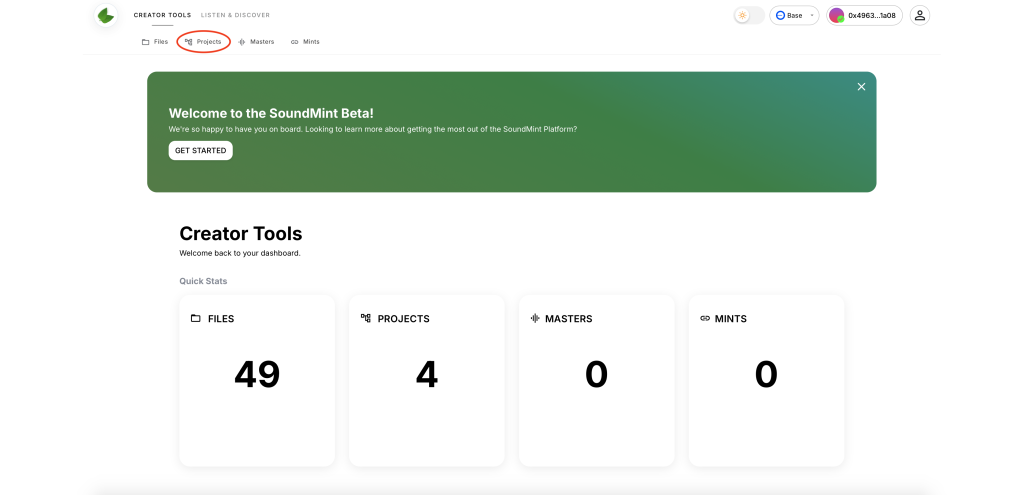
Step 1: Access Projects
Navigate to CREATOR TOOLS and select the PROJECTS option.
Step 2: Select Your Project
Choose the specific project to which you want to invite a collaborator.

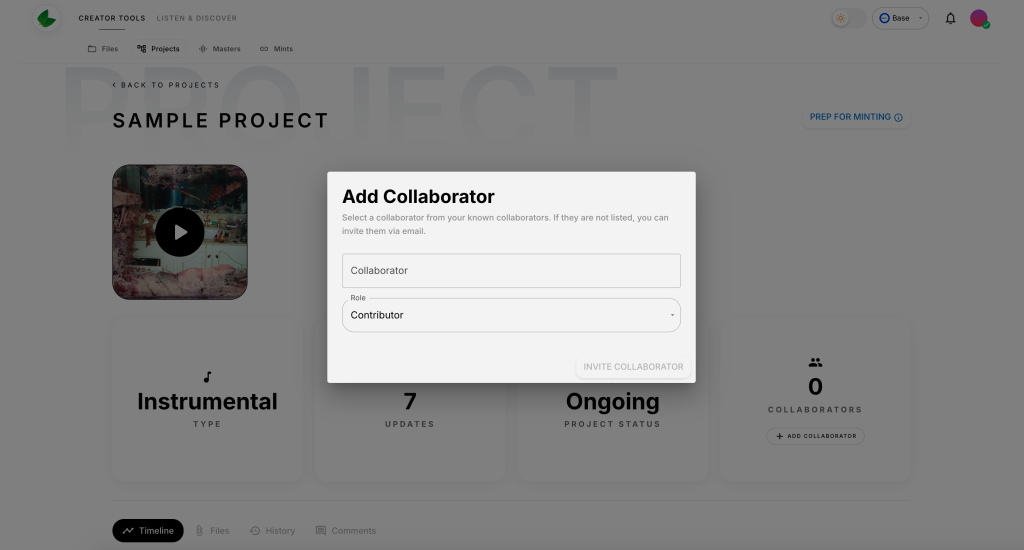
Step 3: Click Add Collaborators
Select the ADD COLLABORATORS button to open the collaboration panel.

Step 4: Send Invitation & Assign Role
You can invite collaborators in two ways:
- Existing SoundMint users: Search by username
- New users: Invite via email address
Assigning Roles
When inviting a collaborator, assign an appropriate role that determines their permissions:
- Viewer: Can view project content but cannot make changes
- Editor: Can upload files and make changes to the project
- Admin: Full access including collaborator management
What Happens Next
Recipients receive either:
- In-app notifications (for existing users)
- Email invitations (for new users)
They can accept or decline the invitation. Once accepted, collaborators gain access to manage the project according to their assigned role.
Good luck with your collaborations! Need to manage your files first? Check out our guide on file uploads.